
Speedboat Santa1.0 - Get APK
You'll be able to download in few seconds.
Publisher Description
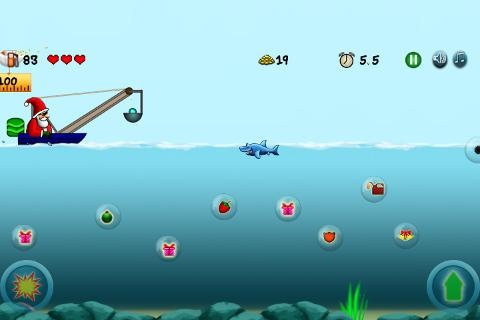
Santa lost his gifts in the ocean somehow somewhere while traveling for Christmas. So now he got a speed boat and he is going over the ocean to get the gifts back. But there are mines, sharks and well, evil oysters trying to stop him. And speedboats run on fuel which also has to be taken care of.
So you shoot a cannon below to free the gifts from their bubbles (they got trapped into bubbles somehow) and jump over the mines and not jump at the sharks.
Santa understands the need for speed so he speeds speedboat over time along with powerups hid in the ocean to aid his effort. Beat your score and compete with others and keep on playing this addictive side scroller. This xmas themed game is fun for both kids and adults.
Credits:
Libgdx
Box2d for cool fun physics
For Sounds:
* Mike Koenig
* Amanda
Please leave your comments/criticism in your reviews or mail in to us at support@rotatingcanvas.com
The permissions are used to show the ads.
Privacy:
This app collects anonymous usage information for the purpose of improving the software. No personally identifiable information is collected. If you have any questions please contact us via the developer email listed.
About Speedboat Santa
The company that develops Speedboat Santa is RotatingCanvas. The latest version released by its developer is 1.0.
To install Speedboat Santa on your Android device, just click the green Continue To App button above to start the installation process. The app is listed on our website since 2012-12-19 and was downloaded 0 times. We have already checked if the download link is safe, however for your own protection we recommend that you scan the downloaded app with your antivirus. Your antivirus may detect the Speedboat Santa as malware as malware if the download link to com.RotatingCanvasGames.SpeedboatSanta is broken.
How to install Speedboat Santa on your Android device:
- Click on the Continue To App button on our website. This will redirect you to Google Play.
- Once the Speedboat Santa is shown in the Google Play listing of your Android device, you can start its download and installation. Tap on the Install button located below the search bar and to the right of the app icon.
- A pop-up window with the permissions required by Speedboat Santa will be shown. Click on Accept to continue the process.
- Speedboat Santa will be downloaded onto your device, displaying a progress. Once the download completes, the installation will start and you'll get a notification after the installation is finished.
Program Details
System requirements
Download information
Pricing
Version History
version 1.0
posted on 2012-12-19
version 1.0
posted on 2012-12-19
Several fixes and updates
Disclaimer
External Download
We do not host Speedboat Santa on our servers. We did not scan it for viruses, adware, spyware or other type of malware. This app is hosted by Galad and passed their terms and conditions to be listed there. We recommend caution when installing it.
The APK Download link for Speedboat Santa is provided to you by apps112.com without any warranties, representations or guarantees of any kind, so access it at your own risk.
If you have questions regarding this particular app contact the publisher directly. For questions about the functionalities of apps112.com contact us.
